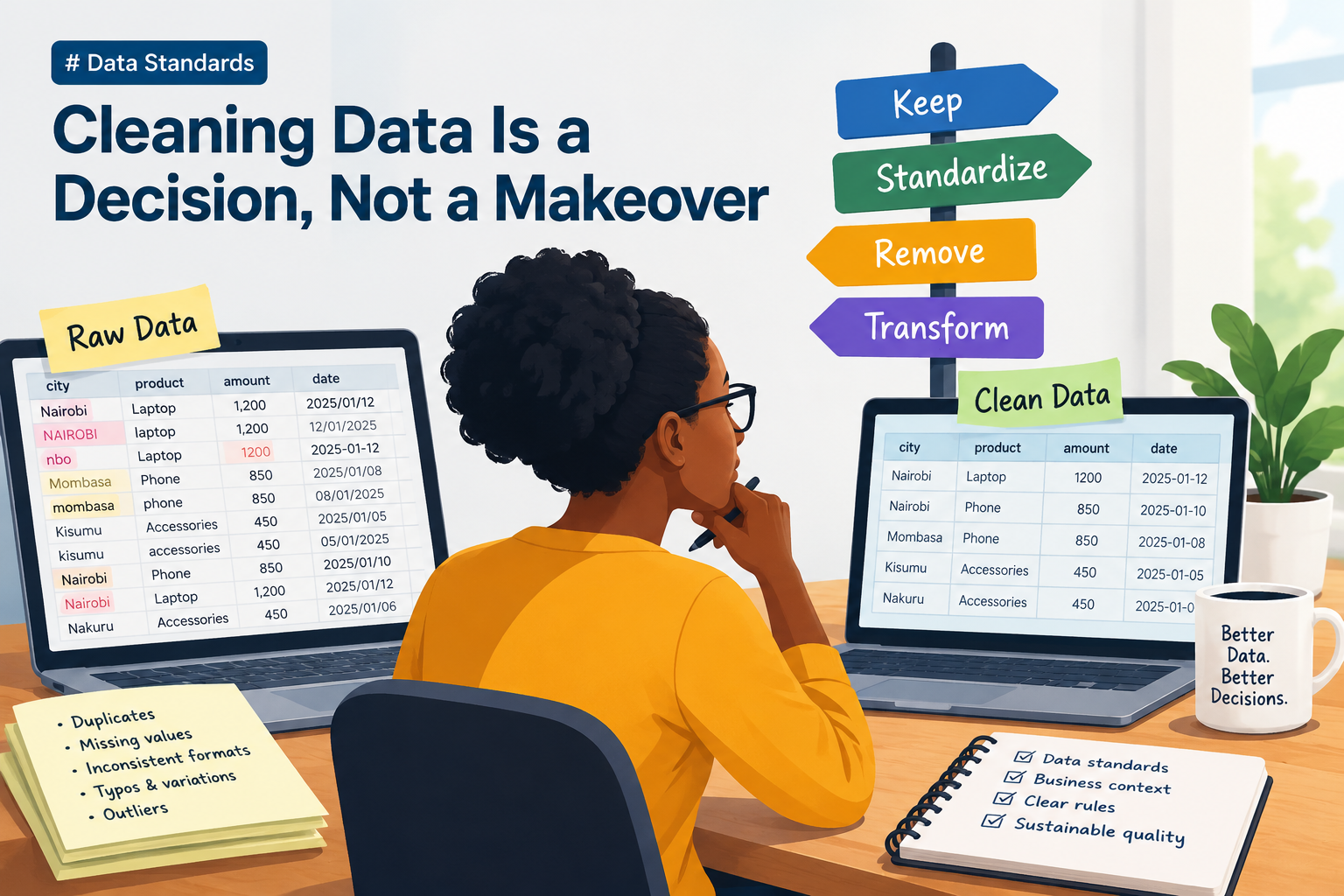
1. Why standards matter
Picture opening a spreadsheet you've just been handed. It's full. Hundreds of rows, all neat in their little cells. You feel good. The hard part's done, right?
Not so fast.
I've been there. You start counting, and the numbers feel off. You group sales by product and get three lines for what's clearly one item. You sort by date and the order makes no sense. You average a column and the answer looks way too low, because half the rows are empty.
The data was there. It just wasn't ready.
Here's what usually hides in a "full" dataset:
Dates in mixed formats. One row says
2026-10-15. The next says15/10/2026. Same day. Two spellings.Product names that don't match.
Apple,apple, andApple(with a sneaky space at the end) look the same to you. To a computer, they're three different things.Missing values. Some break your code. Others sneak through and quietly bend your math.
Think of it like a kitchen where every cook labels the spice jars their own way. The jars are all full. But good luck finding the cumin at 7 p.m. with guests at the door.
That's the point of this article. Data can be present without being ready for use. Standards are what close that gap.
2. What are data standards?
A data standard is just an agreement. It's a rule everyone follows so the same thing always looks the same way.
That's it. No magic. Think of road rules. Everybody drives on the same side, so nobody has to guess. Data standards do that for your columns.
They usually cover four areas:
Format standards decide how a value is represented. Is a date written as
2026-10-30or30/10/2026maybe10/30/2026? Pick one.Naming standards decide how labels and categories are written. Is it
Apple,apple, orAPPLE? Pick one.Validation standards decide which values are acceptable. Can a quantity be negative? Can an order date be in the year 2087? Spell it out.
Missing-data standards decide how absent or unknown values are shown and handled. Is it a blank?
N/A?Unknown? Pick one, and know what it means.
There's a catch. Standards give you consistency. They don't give you accuracy.
You can write every price in the same tidy format and still have the wrong prices. A neat wrong answer is still wrong. Keep that in your back pocket. We'll come back to it.
3. The problem of inconsistent data
So what actually goes wrong when data is messy? Let's look at it.
| Raw values | Potential problem |
|---|---|
Apple, apple, Apple |
One product may appear under several labels. |
2026-10-15, 15/10/2026 |
Dates may be interpreted inconsistently. |
Blank, N/A, Unknown |
Missing or unknown information may be treated differently. |
| Repeated order IDs | Records may be double-counted or the wrong record retained. |
Each row in that table is a small trap. Let's walk through them.
The product that split in three. Say you want to know how many apples you sold this quarter. You group the sales by product name. But your data has Apple, apple, and Apple (that last one has a sneaky space at the end). To pandas (the computer), those are three different products. So your report shows three separate lines, each with a small number next to it. Let's say 40, 35, and 25 respectively.
Now picture your manager reading that report. She sees three tiny products. None of them looks like a winner. What she can't see is that they're really one product with 100 sales, maybe your best seller. So she says, "Apples aren't moving. Let's stop stocking them." And just like that, your top product gets cut. Not because customers stopped buying it. Because the data spelled it three different ways. That's a real business decision, made because of typos.
The date that means two things. Is 03/04/2026 the 3rd of April or the 4th of March? Depends who typed it. If your tool guesses, it'll guess the same way for everything. Even when half the rows meant the opposite.
The blank that isn't the same as "unknown." A blank might mean "we forgot." N/A might mean "doesn't apply." Unknown might mean "we tried and couldn't find out." Those are three different stories. If you treat them as one, you lose the story.
Three different ways of saying "nothing here." Imagine a customer list with a column for phone numbers. Three customers have no number on file, but each one is marked differently:
Sam's phone number is left blank. Nobody ever asked him. The person at the desk was busy and moved on.
Maria's says N/A. That's short for "not applicable." She told us she doesn't own a phone, so there's no number to collect.
Joe's says Unknown. We asked him, twice. He didn't want to share it, or we lost the note. Either way, we tried and came up empty.
The order that shows up twice. Same order ID, two rows. Count both, and your revenue is inflated. Keep the wrong one, and you've got an old price or an old address in your report.
None of this crashes anything. That's what makes it scary. The report still gets built. The chart still looks great. And somebody still makes a decision based off it.
Inconsistency creates extra work. Worse still, it can mislead you.
4. Applying standards in practice with Pandas
Alright, let's get our hands dirty. This is where Pandas, a popular Python library for working with tables, comes in.
A quick note before we start. I'm not going to just show you code. I want to show you the decision behind each line. Because the code is the easy part. Knowing why you're writing it is the skill.
A. Standardizing text
df["product_name"] = (
    df["product_name"].str.strip().str.lower()
)
Two things happen here. .str.strip() trims the invisible spaces at the start and end of each value. .str.lower() turns everything in the string to owercase. So Apple , apple, and APPLE all become apple.
Handy, right? But don't get too comfortable.
Lowercasing fixes spelling style. It doesn't fix meaning. If one row says apple and another says apples, or green apple and granny smith, this code does nothing. A human still has to decide whether those are the same product. Then you write a rule for it, maybe a lookup table that maps every variation to one official name.
So ask yourself first: what should "the same product" mean here? Then reach for the code.
B. Standardizing dates
df["order_date"] = pd.to_datetime(
    df["order_date"], errors="coerce", dayfirst=True
)
Why bother turning dates into real dates? Because text can't do date math. You can't properly sort "15/10/2026" as text. You can't count days between orders. Once it's a true datetime value, all of that just works fine.
Now look at dayfirst=True. That's a decision, not a detail. It tells Pandas, "when a date is unclear, read the day first." Is that right for your data? Only the data-clerk can say for a fact. If your data came from a country or system that writes month first, this setting will scramble things. Use if you are a day first region.
And look at errors="coerce". It means "if you can't read a value, don't crash. Turn it into NaT" (that's "Not a Time," the date version of "missing" value). That's a kind gesture from Pandas. But it's also a warning flag. Every NaT was a value that didn't make sense. Check them out. Don't just let them slide.
C. Handling missing values
missing = df["order_date"].isna()
This one line gives you a True/False answer for every row. True means "this date is missing." Easy to write. The real question is what you do next.
And here's where I'll be honest: there's no single right answer.
Is the missing field needed for your analysis? Maybe you can leave those rows out of this one calculation.
Can you fill it in from another trustworthy source?
Or is it a sign something broke upstream? Maybe the form let people skip the field. Maybe an import failed.
Skipping a missing value feels like the tidy move. But sometimes it's the lazy one. If 40% of your dates are missing, that isn't a cleanup chore. That's a story you need to chase down.
Treat a missing value like a smoke alarm. Sometimes it's burnt toast. Sometimes it's a real fire. You don't know until you bother to look.
You could still determine the percentage of values missing
df = (df.isna().sum() / len(sales_data))*100
You sum the column's missing values, divide by the number of rows in the dataframe. Multiply by 100 to give you the percentage of the missing values. On average, anything over 40% in missing values may mean you cannot expect an accurate representation of the field.
D. Managing duplicates
df = df.sort_values("updated_at")
df = df.drop_duplicates(
    subset="order_id", keep="last"
)
Here's the logic. First we sort by updated_at, oldest to newest. Then we drop repeated order_id values, keeping the last one. In plain words: "If an order shows up more than once, keep the newest version."
Sounds smart. But it only works if two things are true:
The
updated_atcolumn reliably tells you which record is newest. (Is it filled in every time? Is it accurate? Or could it be the date someone ran an export?)Your business rules say the newest record should win. (Maybe in your company the first record is the official one, and later edits need approval.)
If either one's shaky, this tidy little code deletes the wrong rows. And deleted rows don't send you an apology note.
The big takeaway: Pandas gives you the tools. The standard tells you how to use them.
5. Standards require judgment, not blind automation
It's tempting to write one cleaning recipe and run it on every column. One loop. Done by lunch.
Please don't. I've seen what happens.
Say you lowercase every text column. Product labels? Fine. But what about a tracking code like aB3xK9? In some systems, case matters. aB3xK9 and ab3xk9 could be two different packages. Lowercase them all, and you may have just merged two real records into one. Or broken your link to another system.
Or say you replace every missing value with zero. Looks clean and efficient, too! But a missing price and a price of zero aren't the same thing.
One says "we don't know."
The other says "it was free."
Fill in the zeros and your average price drops, and nobody can tell why.
It's like using one wrench for every bolt. Sometimes it fits. Sometimes you strip the thread.
So before you touch any column, slow down and ask three questions:
What does this field represent? A name? A code? A count? A date? A rating? What does a blank mean here?
What rule fits that field? Not the rule that's easiest. The rule that matches what the field is.
How will I check that the rule didn't hurt the data? Before you start, know what "still fine" looks like.
That third question is the one people skip. We'll give it its own section next.
Good standardization retains the meaning and improves the consistency. If you lose the first to get the second, you haven't cleaned anything. You've just made it look nicer.
6. Checking whether the standards worked
You ran your cleaning code. No errors. It looks good. So we're done, right?
Nope.
A transformation isn't proof of quality. It's just proof that the code ran.
Think about proofreading. You'd never write an essay, fix a few typos, and hit "send" without reading it again. Data deserves the same respect.
Here's a simple checklist I like to run after cleaning:
Remaining missing values. How many are left? Is that number expected? Did any new ones appear?
Unexpected formats. Do all your dates look like dates? Do your IDs still follow the pattern they should?
Duplicate identifiers. Is each
order_idnow truly unique? Count them.Invalid dates. How many
NaTvalues did the conversion create? Why?Changes in record counts. How many rows did you start with? How many now? If say you lost 500, can you explain exactly why?
Then do the step most people miss: compare against the original. Keep a copy of the raw data. Line it up next to the cleaned version. Look at what changed. Look at what shouldn't have changed but did.
A few small checks go a long way:
print(len(original), len(df))           # Did the row count change?
print(df["order_id"].is_unique)         # Are IDs now unique?
print(df["order_date"].isna().sum())    # How many dates are still missing?
Nothing fancy. Just asking the data, "Are you okay?" and listening for the answer.
Validation gives you evidence.
Without it, all you've got is hope.
7. To sum it up: Standards make data usable
Let's go back to where we started. That full-looking spreadsheet. All those cells, all that promise, and a nagging feeling something's off.
Now you know why. The data was present. It just wasn't ready.
Standards are how it gets ready. When your data follows clear rules:
Comparisons become dependable. Apples are apples. Dates line up. Totals mean what they say.
You clean less, over and over. Fix the rule once instead of fixing the mess every month.
Your work can be repeated. A colleague (or future you) can run the same steps and get the same result.
You trust your own analysis. And so does everyone you share it with.
Cleaning data isn't merely about tidying values. It's about deciding what a value should mean/represent, setting a consistent rule, applying it within reason, and then checking that it worked.
That's the whole recipe.
Good data work comes down to three things: clear rules, suitable tools, and careful verification.
Pandas is a great tool. But it's the rules and the checking that make your data something people can trust.
So next time you open a "full" spreadsheet, take a breath. Ask what each value should mean. Write the rule(s). Run the code. Check the result.
Your future self will thank you.
About the author
- Passionate about the intersection of data and technology in practical problem solving. Writing about Python, SQL, PostgreSQL, and Power BI; creating practical systems that transform data into meaningful insights and facilitate better decision-making. Always learning, building, and sharing knowledge along the way. . .
Comments
Join the discussionNo comments yet. Be the first to comment.